A phone supplies the computing power for a laptop-shaped accessory. A keyboard key becomes a mouse. A display folds during a fall. These ten Apple patent drawings explore what happens when familiar devices change their roles or their physical shape.
The US patent documents depict removable parts, extended and curved displays, and a storage case that becomes an interface. These are proposals recorded in patents.
Dock a phone-like device into a laptop-style accessory
What is it?
Look at the dashed lines from the small device to the recess below the keyboard. The patent describes a host device supplying computing resources to an accessory with little or no independent processing capability.
The accessory can add a larger display, keyboard and battery. In one arrangement, the docked host touchscreen also serves as a trackpad, so the same device provides both computation and an input surface.
- ASSIGNEE
- Apple Inc.
- PRIORITY
- 2015-09-21
- PUBLISHED
- 2017-03-23
- PUBLICATION
- US20170083048A1
- INVENTORS
- Brett W. Degner
Pull a key off the keyboard and use it as a mouse
What is it?
Compare the raised module with the opening it leaves in the keyboard. The drawings show different ways to release an input device that normally occupies part of the keyboard.
In the proposed arrangement, the module acts as a key while attached and as a pointing device when removed. The document describes position sensing, including optical tracking of movement across a surface, as well as click input.
- ASSIGNEE
- Apple Inc.
- PRIORITY
- 2020-02-19
- PUBLISHED
- 2021-08-19
- PUBLICATION
- US20210255711A1
- INVENTORS
- Paul X. Wang
Sample real-world colors with a stylus
What is it?
Follow the arrow from the object on the right to the tablet. A sensor at the tip or opposite end of the stylus measures the color of an external object, and the stylus can send that information to another device.
The measured color can then be used for drawing or editing. It extends the idea of an on-screen eyedropper tool to physical things that are not already part of the image.
- ASSIGNEE
- Apple Inc.
- PRIORITY
- 2019-01-14
- PUBLISHED
- 2020-07-16
- PUBLICATION
- US20200225778A1
- INVENTORS
- Nicholas C. Lewty / ほか
Turn a wireless-earbud case into a tiny control device
What is it?
Notice the separate arrows for the audio stream and for commands and status information. In the pictured arrangement, music comes from another device, while the case provides a touch interface for controlling playback.
The lower drawing shows a finger selecting the next-track control. The patent gives the case a display and touch-sensitive surface, turning the object that stores and charges the earbuds into an interactive controller.
- ASSIGNEE
- Apple Inc.
- PRIORITY
- 2021-09-24
- PUBLISHED
- 2024-06-04
- PUBLICATION
- US12001753B2
- INVENTORS
- Darius A. Satongar / William D. Lindmeier / Per Haakan Linus Persson
Rotate a ring to control a computer
What is it?
The overview separates the ring on the hand from the display it controls. The document describes an outer ring that can rotate relative to an inner ring, with sensors detecting the input.
That motion can be assigned to scrolling, selecting a value, or adjusting settings such as volume and display brightness. The rotation mechanism is described in the document; the overview here shows how the ring fits into the wider system.
- ASSIGNEE
- Apple Inc.
- PRIORITY
- 2019-09-26
- PUBLISHED
- 2023-08-01
- PUBLICATION
- US11714494B2
- INVENTORS
- Gabriele D'Amone / Ivan S. Maric / Aidan N. Zimmerman / Stephen E. Dey / Muhammad F. Hossain
Lift the Watch band to take a photo
What is it?
Look at the camera opening near the end of the band held between the fingers. The camera is on the band, rather than fixed to the face of the watch.
The flexible section can bend and twist so the user can aim the camera without pointing the watch body in the same direction. The patent also describes using the watch display as a viewfinder.
- ASSIGNEE
- Apple Inc.
- PRIORITY
- 2016-09-16
- PUBLISHED
- 2019-06-25
- PUBLICATION
- US10331083B1
- INVENTORS
- Trevor J. Ness / Michael B. Wittenberg / Elizabeth B. Diaz
Wrap an almost all-screen display around the wrist
What is it?
Compare the extended display above with the curved version on the wrist below. The patent combines a flexible display with a bi-stable spring, a structure with two stable shapes, like a slap bracelet.
The spring can change from a flat form to one that curls around the wrist. This gives the display a different supporting structure from a rigid watch face attached to a separate band.
- ASSIGNEE
- Apple Inc.
- PRIORITY
- 2011-08-17
- PUBLISHED
- 2013-02-21
- PUBLICATION
- US20130044215A1
- INVENTORS
- Fletcher R. Rothkopf / Derek W. Wright / Scott A. Myers
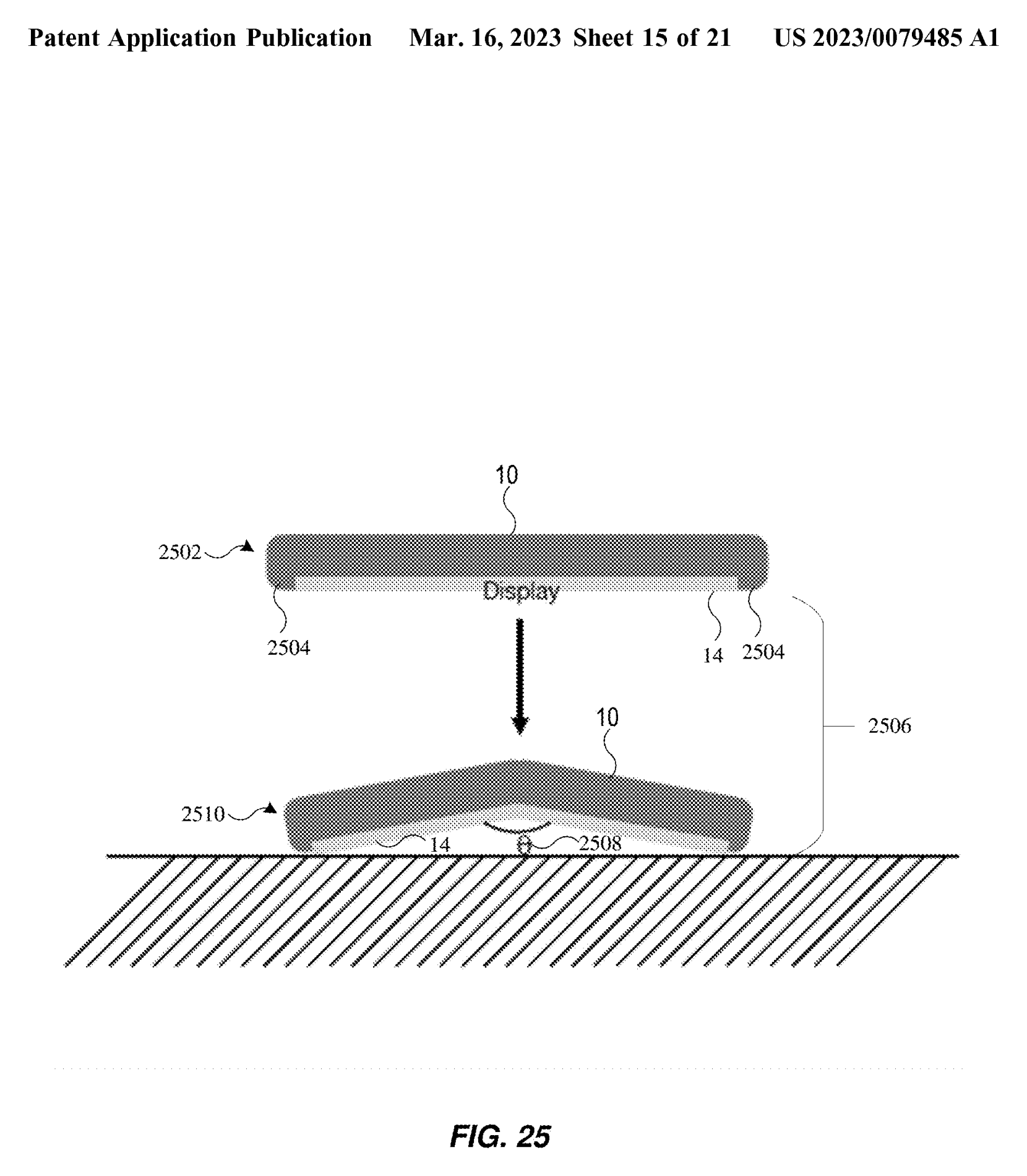
Fold itself during a fall to protect the screen
What is it?
Read the drawing from top to bottom. The device begins flat, then bends so the display surface stays above the line representing the ground. The patent describes detecting a fall and reducing the angle between display portions to less than 180 degrees.
The intended result is for the edges to receive the impact instead of the display. A separate embodiment describes a motorized hinge; the drawing here shows the protective motion, not a guarantee that every fall ends this way.
- ASSIGNEE
- Apple Inc.
- PRIORITY
- 2021-09-14
- PUBLISHED
- 2023-03-16
- PUBLICATION
- US20230079485A1
- INVENTORS
- Hoon Sik Kim / Michael B. Wittenberg
Let a damaged display heal itself
What is it?
This is a cross-section of the layers, not a before-and-after demonstration of a repaired screen. The patent describes self-healing material intended to reduce scratches or dents in the display cover; the illustrated arrangement also places an elastomer in the flexible region.
Other arrangements in the document describe healing without an external prompt or with heat, light or electric current initiating or accelerating the process. These are proposed material and layer configurations, not measured durability results.
- ASSIGNEE
- Apple Inc.
- PRIORITY
- 2019-03-26
- PUBLISHED
- 2020-10-01
- PUBLICATION
- US20200313111A1
- INVENTORS
- Hoon Sik Kim / Leiming Wang / ほか
Replace the view outside a car with another world
What is it?
Compare the canoe, aerial view and street scene. The patent describes presenting a passenger with a virtual environment whose events correspond to the movement of the real vehicle.
A turn on the road could become a bend in a virtual river, while a bump could be represented as the canoe passing over an obstacle. The point is to connect felt movement with events in the scene, rather than merely play a video inside a car.
- ASSIGNEE
- Apple Inc.
- PRIORITY
- 2016-09-23
- PUBLISHED
- 2024-03-07
- PUBLICATION
- US20240078770A1
- INVENTORS
- Mark B. Rober / ほか
AFTER THE FIGURES
Device roles and shapes in ten patents
The drawings suggest two recurring ideas. The first is a change of roles: a portable device supplies the computing power, a key becomes a mouse, an earbud case becomes a controller, a watch band carries a camera, and a ring supplies input.
The second is a change in the object itself. A display wraps around a wrist, folds to reduce exposure during a fall, or includes material intended to repair surface damage. FIG. 08 and FIG. 09 approach the same vulnerability from opposite sides: protection before impact and repair after damage.
The vehicle display takes the idea beyond the device, changing how a passenger experiences movement through a place. Together, these documents preserve alternative designs worth comparing, even where the proposed mechanism has not been verified in a public product.
SOURCES
Primary sources
- US20170083048A1 — Electronic accessory device
- US20210255711A1 — Deployable key mouse
- US20200225778A1 — Computer System With Color Sampling Stylus
- US12001753B2 — Devices, methods, and graphical user interfaces for interactions with a headphone case
- US11714494B2 — Ring input devices
- US10331083B1 — Watch band with optical sensor
- US20130044215A1 — Bi-stable spring with flexible display
- US20230079485A1 — Self-retracting display device and techniques for protecting screen using drop detection
- US20200313111A1 — Electronic Devices With Flexible Display Cover Layers
- US20240078770A1 — Immersive virtual display